FTP · FTPS explicit · FTPS implicitAccessory-assisted camera client2014
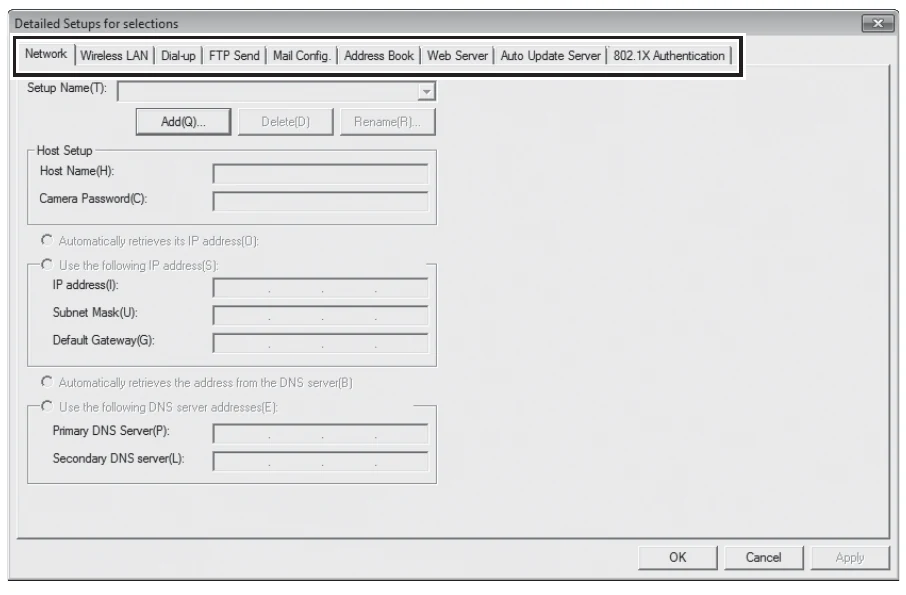
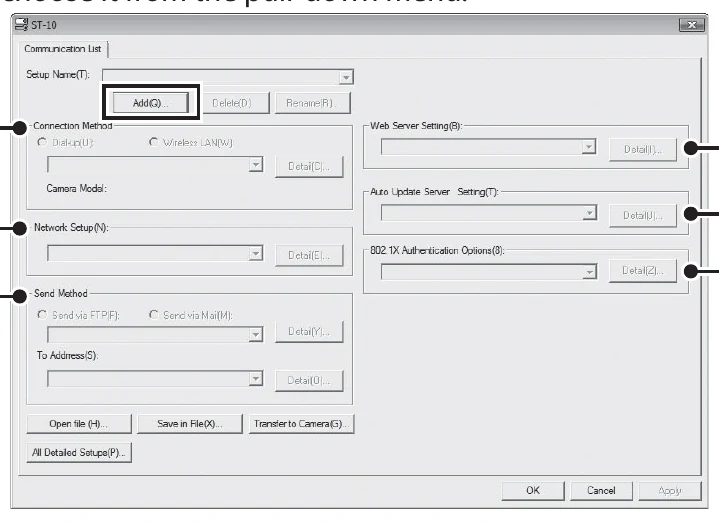
The G800SE sends captured stills and recorded movies to configurable FTP or FTPS servers over built-in Wi-Fi. Its first communication list must be created in Ricoh ST-10 for Windows and copied to the camera; after import, the camera can select a destination and initiate playback, quick-send, automatic, or power-off transfers.
Menu path: ST-10 > All Detailed Setups > Add > ST-10 > Network > ST-10 > Wireless LAN > ST-10 > FTP Send > ST-10 communication list > save and copy > Expanded Settings > Communication Mode > W-LAN > Playback Menu > File Send / Expanded Settings > Quick Send Mode. Protocols: FTP · FTPS explicit · FTPS implicit. Sends: captured still images · recorded movie files.
Documented from the manufacturer manual. Sources reviewed .
Transportbuilt-in 2.4 GHz Wi-Fi through an access point or hotspot
Payloadcaptured still images · recorded movie files
Triggersplayback File Send / one-touch or two-touch quick send / automatic transfer after capture / queued still or still-plus-movie transfer at power-off
Before you touch the menu
What to gather
01G800SE firmware 1.10.
02A Windows computer with Ricoh ST-10 installed.
03A camera-formatted memory card or USB connection for transferring the communication list.
04A 2.4 GHz Wi-Fi access point or hotspot.
05Camera to Anywhere server/IP, port, username, password, remote folder, encryption mode, and certificate when required.
Connection fields
Server Name
The Camera to Anywhere hostname or IP address.
Identifies the destination FTP server.
User Name and Password
The per-source credentials.
Authenticates the camera and maps it to the correct input.
Specify Folder
The assigned remote directory.
Routes uploads into the intended workflow.
Download files with the same names
Leave clear during validation unless overwriting is explicitly intended.
When selected, a duplicate filename replaces the server copy.
PASV
Enable for a typical endpoint behind NAT or a firewall.
Uses passive FTP data connections.
Encryption
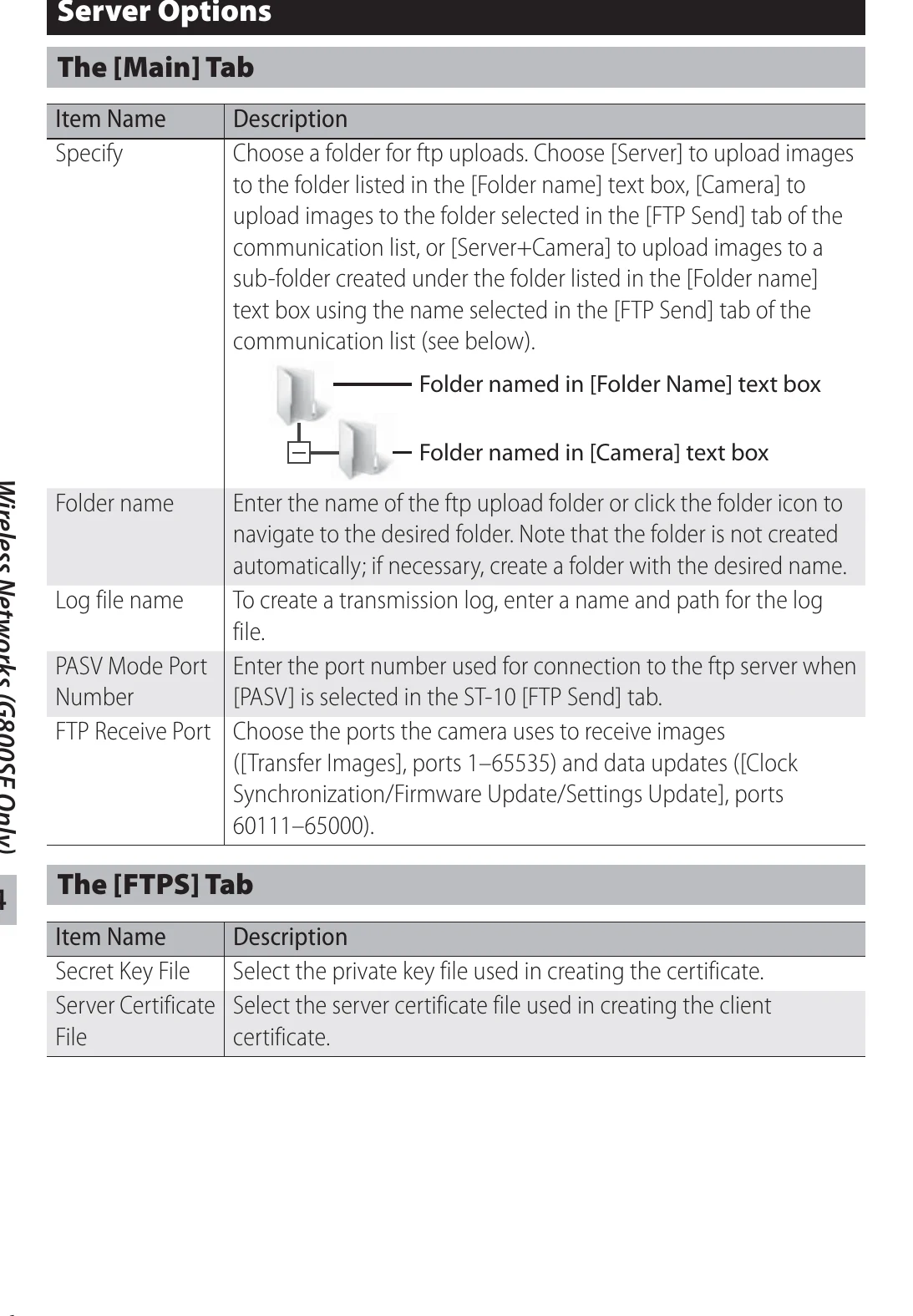
Plain FTP, Explicit FTPS, or Implicit FTPS to match the endpoint.
Must match the listener's TLS mode.
FTP port number
The exact assigned port.
Connects to the correct ingress listener.
Certificate Path
The official endpoint certificate/root file when FTPS validation requires it.
ST-10 packages the certificate for the camera.
ESS-ID / Network Key
The venue SSID and its Wi-Fi credential.
Allows the camera to join the access point as a station.
The menu, step by step
01
ST-10 > All Detailed Setups > Add
Create and name a destination setup.
MANUFACTURER MANUAL EXCERPT · 1/1
ST-10 stores the camera network, wireless LAN and FTP Send values in one communication-list entry.
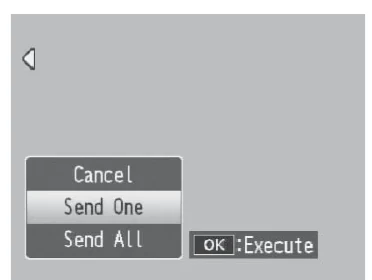
Playback File Send for one, selected, or all files
1Touch transfer during image review
2Touch transfer of the latest photo or movie
Auto transfer of new photos
Queued still or still-plus-movie transfer at power-off
Media behavior
Playback transfer can send captured still images and recorded movie files.
1Touch sends photos only; 2Touch can select the most recent photo or movie.
Auto sends new photos at original size and ignores the Image File Size resize setting.
Auto Delete can remove photos from the camera after successful transfer and should be left off during initial validation.
A manual interruption can be triggered by DISP., playback, shutter, or mode operations depending on the transfer screen.
Limits and warnings
ST-10 is Windows-only and is required to create the first wireless communication list.
The camera's documented wireless range is about 30 m in unobstructed conditions.
Photos are not quick-sent in scene mode or supported continuous/burst modes; flash charging and optical zoom are limited during transfer.
The optional SR-10 server is not required for Camera to Anywhere and accepts only this camera family.
The guide documents FTP and explicit/implicit FTPS, not SFTP.
Prove it on your body
Run this checklist on the exact body, firmware, network, and media format you will use on assignment.
Update to firmware 1.10. Ricoh documents fixes for IIS overwrite transfers, slow FTP-server responses, FTPS certificates, root-directory paths, and power-off FTP transfer behavior in earlier firmware. Physical Camera to Anywhere interoperability is not yet lab-verified.
01ST-10 list contains the intended FTP/FTPS profile.
02The list is copied/imported and appears under Send To.
03The camera joins the intended SSID.
04Playback File Send delivers one JPEG.
05Remote filename and byte size match.
06Auto Delete remains off until retention behavior is approved.
If it will not send
01No upload server name
Set Server Name in ST-10 > FTP Send and re-transfer the communication list.
02Cannot detect IP or connect
Verify SSID/key, DHCP or static gateway/DNS values, endpoint host, port, and passive mode.
03User name or password error
Re-enter the per-source credentials in ST-10 and import the updated list.
04Folder does not exist
Use the exact assigned remote folder and create/authorize it server-side before retrying.
05Auto transfer does not run
Confirm Communication Mode is W-LAN, a Send To destination is selected, and the shooting/drive mode permits quick send.
Sources
The local archive keeps this research reproducible if an official link changes. It is not redistributed through this site.
01
Ricoh G800 Series Camera User Guide
Printed pp. 137-160, Wireless Networks; pp. 141-143, ST-10 Network/Wireless LAN/FTP Send fields; pp. 156-160, transfer workflows