The GFX100 II initiates FTP, FTPS, or SFTP uploads without an external transmitter. It can use its built-in dual-band Wi-Fi or wired LAN port, save combined network/server profiles, upload selected stills or movies, and automatically order new captures for transfer.
Menu path: Network/USB Setting > Create/Edit Connection Setting > Create Using Wizard > Select Comm Setting > Access Point Setting / IP Address Setting > FTP Server Setting > Create New > Connection Test > Select > Network/USB Setting > FTP Optional Setting. Protocols: FTP · FTPS · SFTP. Sends: JPEG · RAW · HEIF · TIFF · MOV · MP4.
Documented from the manufacturer manual. Sources reviewed .
Transportbuilt-in 2.4/5 GHz Wi-Fi + built-in wired Ethernet LAN port
PayloadJPEG · RAW · HEIF · TIFF · MOV · MP4
Triggersautomatic transfer order after capture / manual select-and-transfer in playback / priority transfer order / continue queued upload while powered off
Before you touch the menu
What to gather
01Current camera firmware.
02A configured Wi-Fi network or Ethernet connection.
03A memory card with a test JPEG.
04Camera to Anywhere hostname, protocol, port, credentials, and remote directory.
05The approved root certificate on the memory card when the FTPS endpoint requires a private or self-signed trust root.
Connection fields
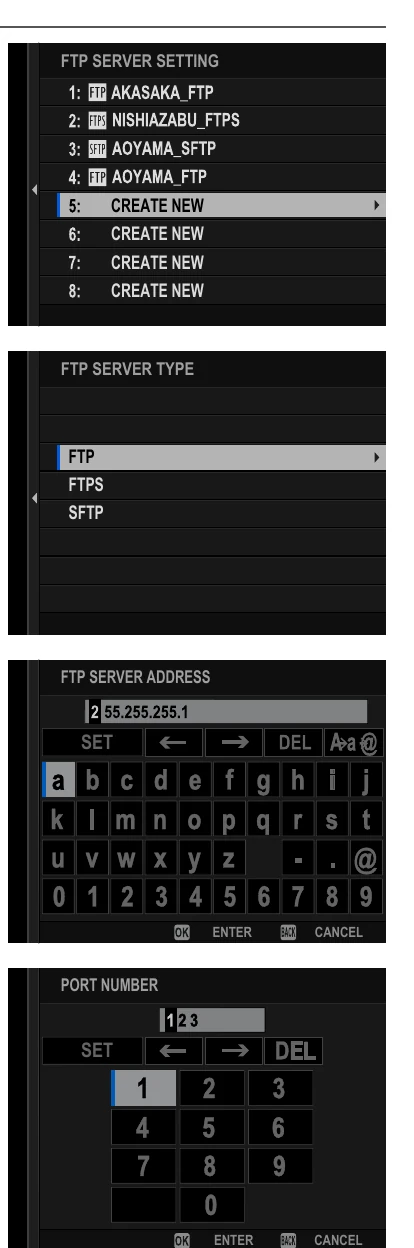
FTP Server Type
FTP, FTPS, or SFTP.
Selects the endpoint security and transport behavior.
FTP Server Address
The Camera to Anywhere hostname only.
Identifies the upload server.
Port Number
The exact port issued for the source.
Must match the active ingress listener.
Proxy Server
Disable unless a network administrator provides proxy details.
Most direct and hotspot connections do not use an FTP proxy.
Passive Mode
Enable for FTP/FTPS behind NAT unless the endpoint specifies otherwise.
Prevents dependence on an inbound data channel to the camera.
Login
User Name & Password with the per-source credentials.
Authenticates and routes this camera's files.
Specify Target Folder
The assigned gallery/input path.
Keeps this source isolated from other jobs.
Overwrite Same File Name
No for safe initial operation.
Causes a numeric suffix instead of destructive replacement.
Root Certificate
Load from memory card when the FTPS server's chain is not already trusted.
Enables TLS certificate validation.
The menu, step by step
01
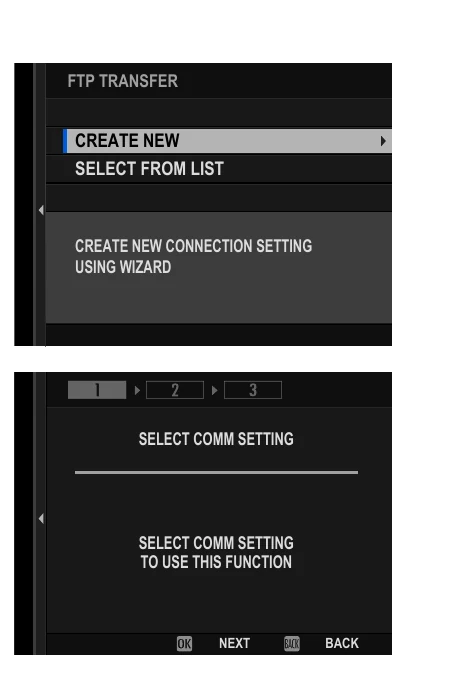
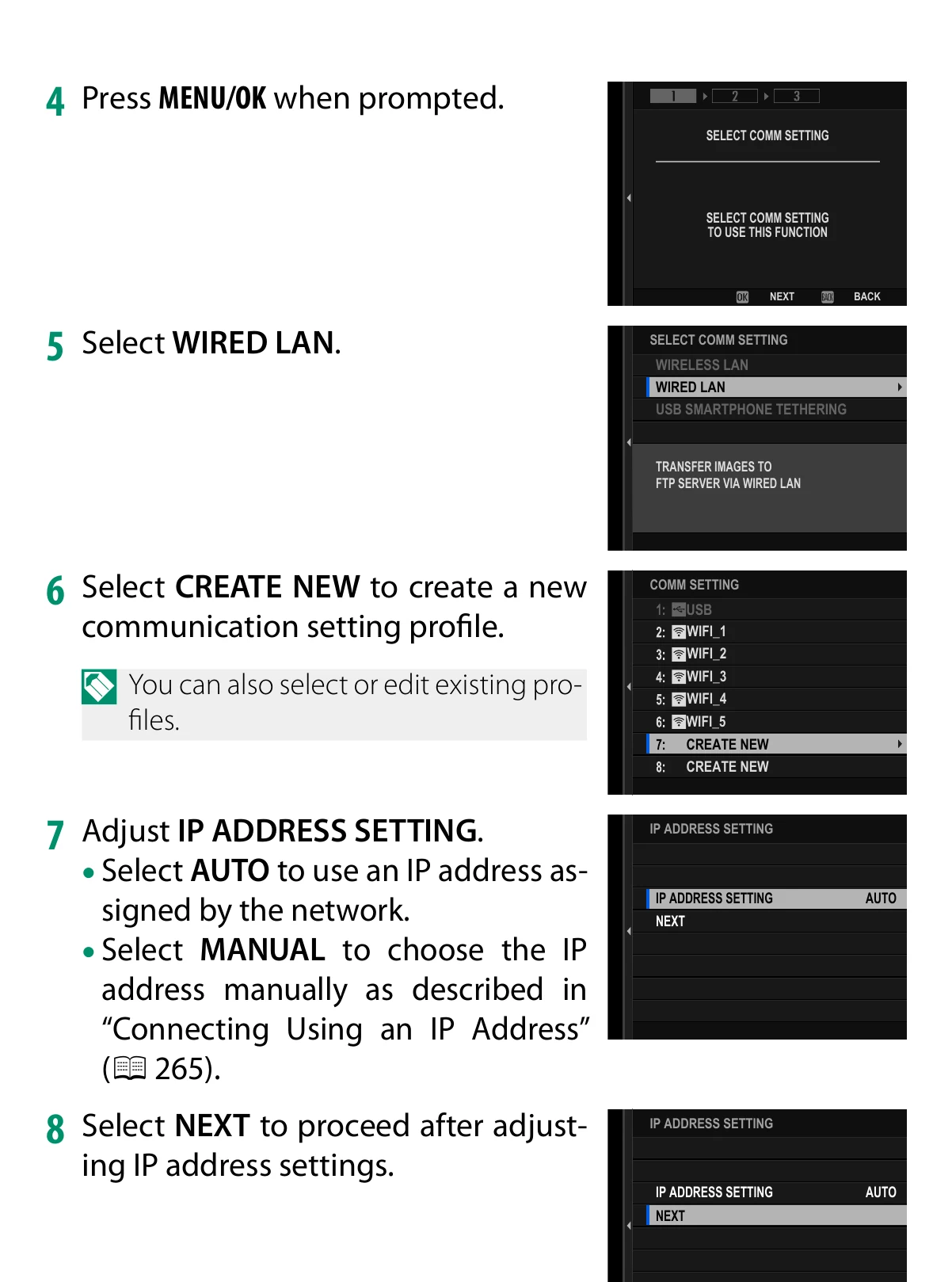
Network/USB Setting > Create/Edit Connection Setting > Create Using Wizard
Choose FTP Transfer, then Create New.
MANUFACTURER MANUAL EXCERPT · 1/1
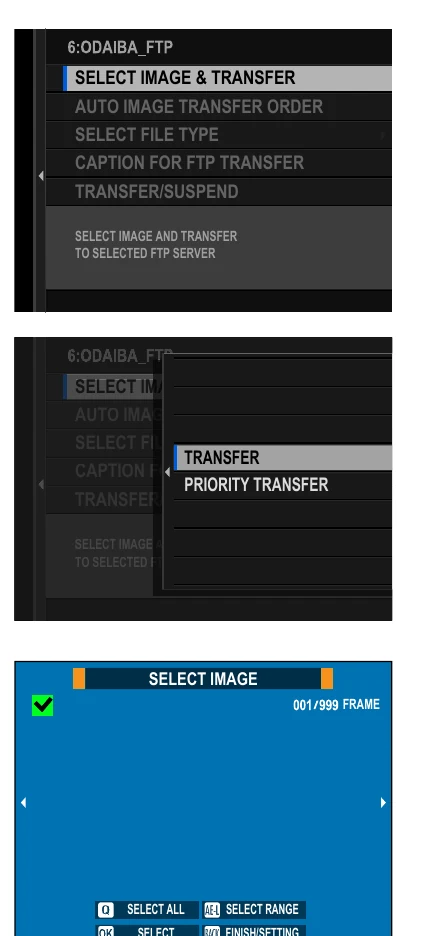
Create Using Wizard starts an FTP Transfer route and connects it to a saved communication setting.
Selectable formats are JPEG, RAW, HEIF, TIFF, MOV, and MP4.
Manual orders can include up to 9,999 items.
Slot or filter changes clear current selection marks.
The camera can add a default or created caption.
FTP Power Saving can disable networking after the current queue empties.
Limits and warnings
Wired LAN requires a physically connected Ethernet network; Wi-Fi and Ethernet settings are separate communication profiles.
A root-certificate change is shared with Frame.io Camera to Cloud certificate settings on this camera.
Automatic ordering applies to new captures; movie-file behavior should be verified with the selected recording format.
Re-test after firmware, DNS, or endpoint certificate changes.
Prove it on your body
Run this checklist on the exact body, firmware, network, and media format you will use on assignment.
For FTPS, import and select the required root certificate. Use current camera firmware and revalidate the server profile after firmware changes. Physical Camera to Anywhere interoperability is not yet lab-verified.
01Correct connection profile is active.
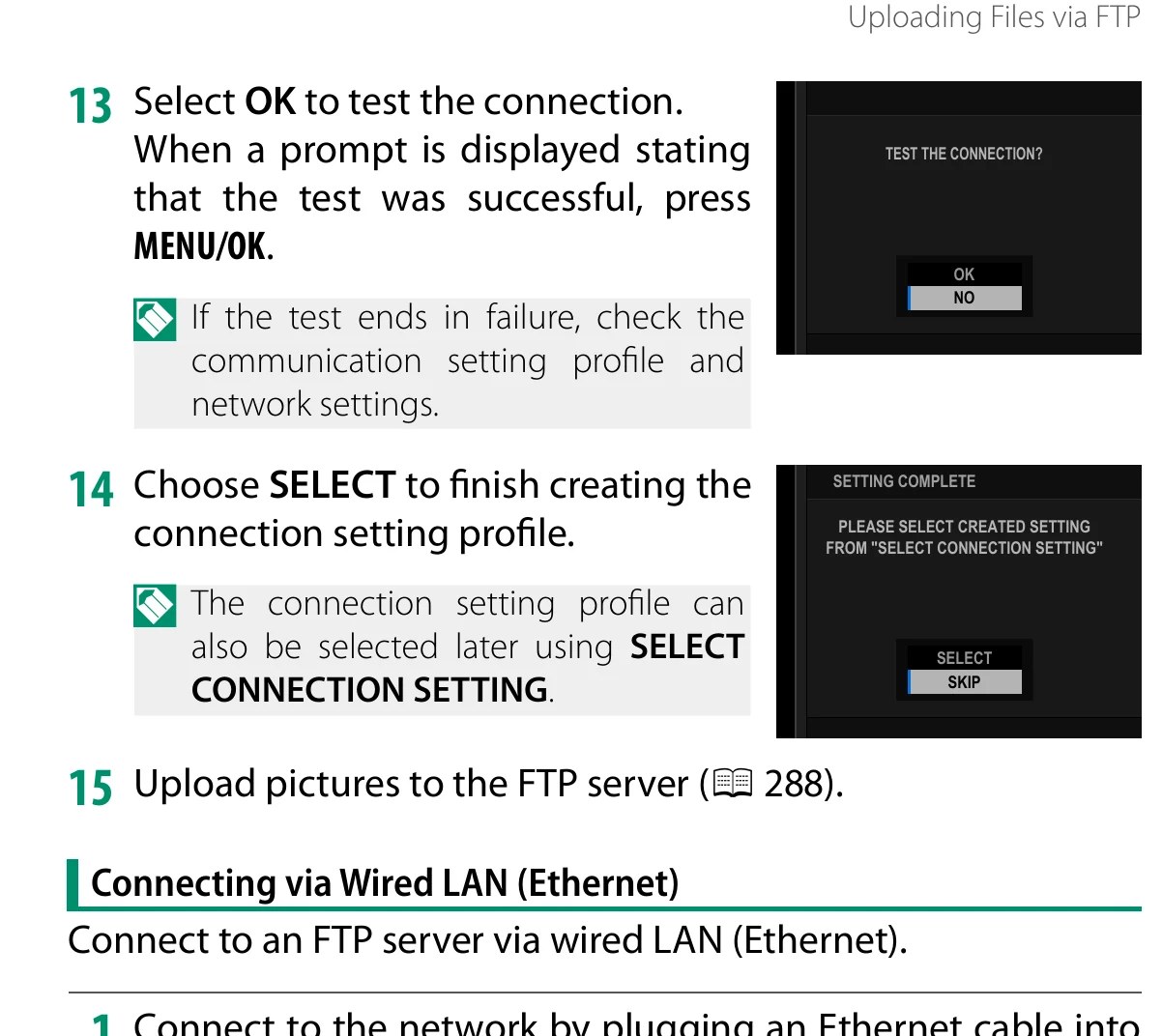
02Connection test succeeds.
03A JPEG reaches the correct input folder.
04Filename and byte size match.
05A chosen RAW or movie test behaves as expected.
06Power-off continuation and power-saving behavior are understood before production.
If it will not send
01No network connection
Confirm the active profile uses the connected transport and that DHCP or static IP, gateway, and DNS values are valid.
02Network works but FTP is orange/not ready
Verify the server hostname, port, protocol, credentials, target folder, and venue firewall policy.
03FTPS cannot authenticate the server
Load the correct root certificate and verify the endpoint hostname.
04New captures are not queued
Turn on Auto Image Transfer Order and confirm the desired file type is enabled.
Sources
The local archive keeps this research reproducible if an official link changes. It is not redistributed through this site.
01
Fujifilm GFX100 II Owner's Manual
Printed pp. 278-290, Uploading Files via FTP; printed pp. 326-327, FTP Optional Setting