← All cameras

Sony PDW-850 FTP setup

FTP · FTPSAccessory-assisted camera client2013

PDW-850 can initiate FTP, FTPS transfer of original clips from optical disc, adapter-recorded proxy clips over wired Ethernet; Wi-Fi via CBK-WA100/101; 3G/4G/LTE modem via adapter. The documented route accepts a user-configured server; it is suitable for a destination-neutral ingest gateway after protocol, firmware, and payload testing.

Menu path: Attach and configure the network adapter > Open the adapter web UI or Content Browser Mobile > Upload Server / FTP Server Settings > Select media → Transfer > Auto Upload, when supported. Protocols: FTP · FTPS. Sends: original clips from optical disc · adapter-recorded proxy clips.

Documented from the manufacturer manual. Sources reviewed .

Transportwired Ethernet + Wi-Fi via CBK-WA100/101 + 3G/4G/LTE modem via adapter
Payloadoriginal clips from optical disc · adapter-recorded proxy clips
Triggersdirect camera FTP/FTPS is manual; CBK-WA100/101 firmware adds auto transfer after recording

Before you touch the menu

What to gather

  1. 01Use the documented network path: wired Ethernet; Wi-Fi via CBK-WA100/101; 3G/4G/LTE modem via adapter.
  2. 02Install or attach the required components: none for direct wired FTP/FTPS; CBK-WA100/101 for wireless/mobile transfer and adapter auto-upload workflows.
  3. 03Prepare a reachable FTP, FTPS endpoint with a writable destination and a camera-specific credential.
  4. 04Firmware/license qualification: Camera SECURITY LEVEL2 uses FTPS but disables direct FTP transfer and some web functions; adapter capabilities depend on firmware.

Connection fields

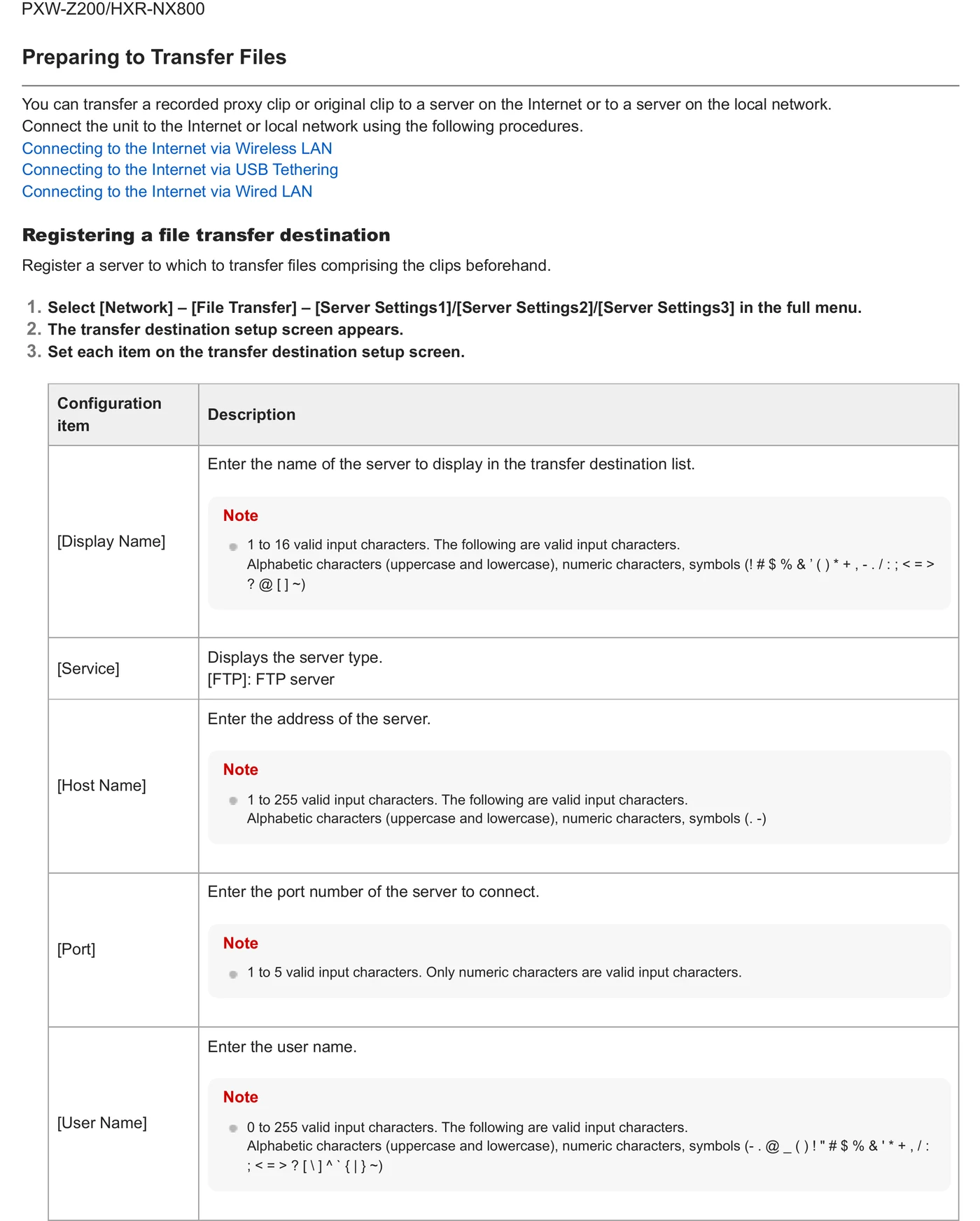
Server Name

An operator-facing destination label.

Distinguishes the production ingest endpoint from vendor-cloud presets or prior assignments.

Server Address / URL

The DNS host or IP value specified by the FTP endpoint.

Directs the camera or adapter to the destination-neutral server.

Protocol / secure connection

A mode explicitly supported by this path: FTP, FTPS.

Must match the listener and its certificate/security configuration.

Port

The port issued with the ingest credential.

Avoids relying on defaults when the gateway uses a dedicated listener.

User Name / Password

A least-privilege credential unique to the camera or event.

Permits isolation, audit, and fast revocation.

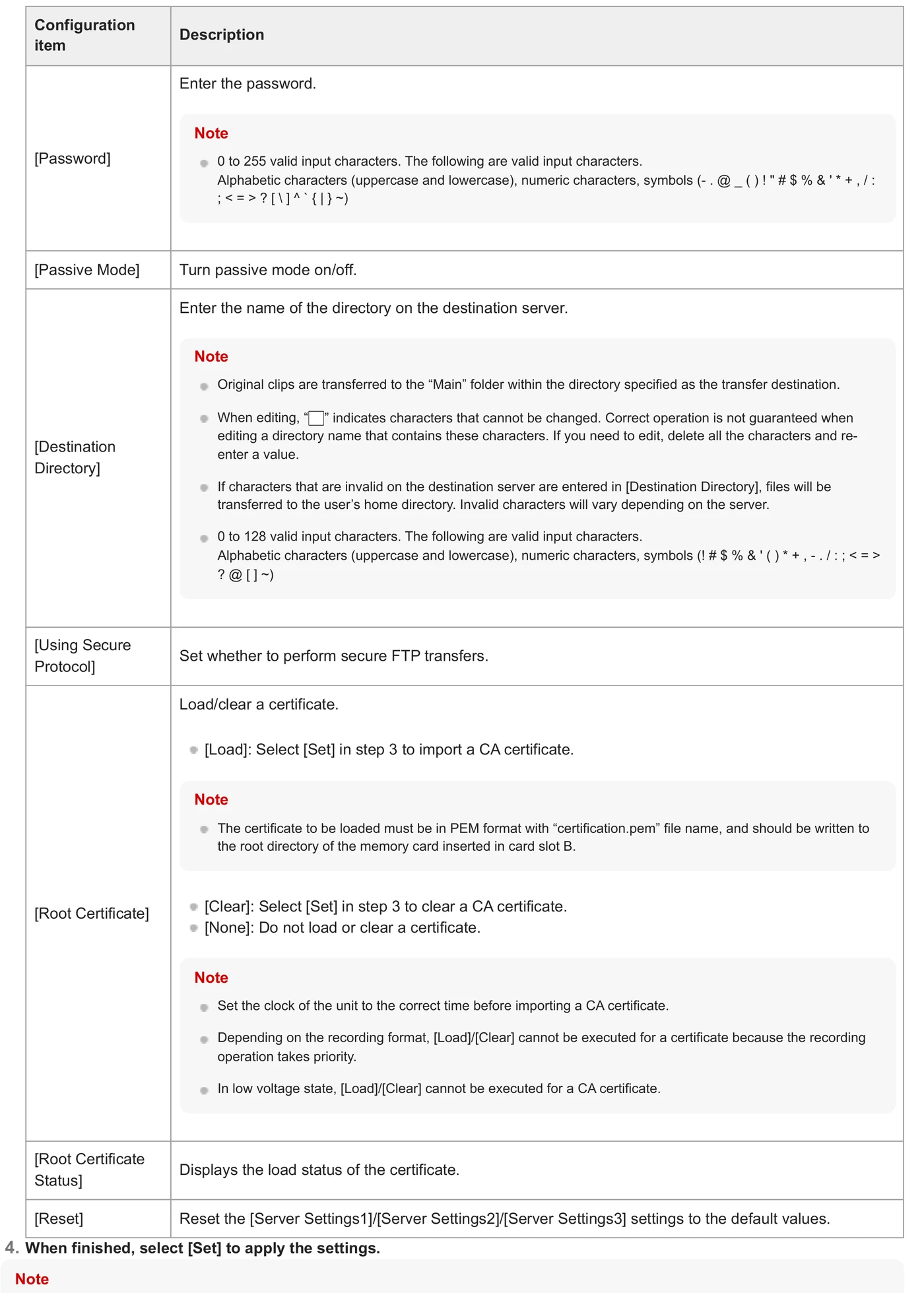
Destination Directory

The assigned remote folder, without adding an unverified web URL prefix.

Routes clips into the correct job inbox.

Active / Passive

Match the server; passive is normally required through venue NAT.

Controls how the FTP data channel is opened.

Root Certificate

The trusted CA root required by the FTPS/FTPES server, in the format specified by Sony.

Allows TLS server validation instead of bypassing certificate errors.

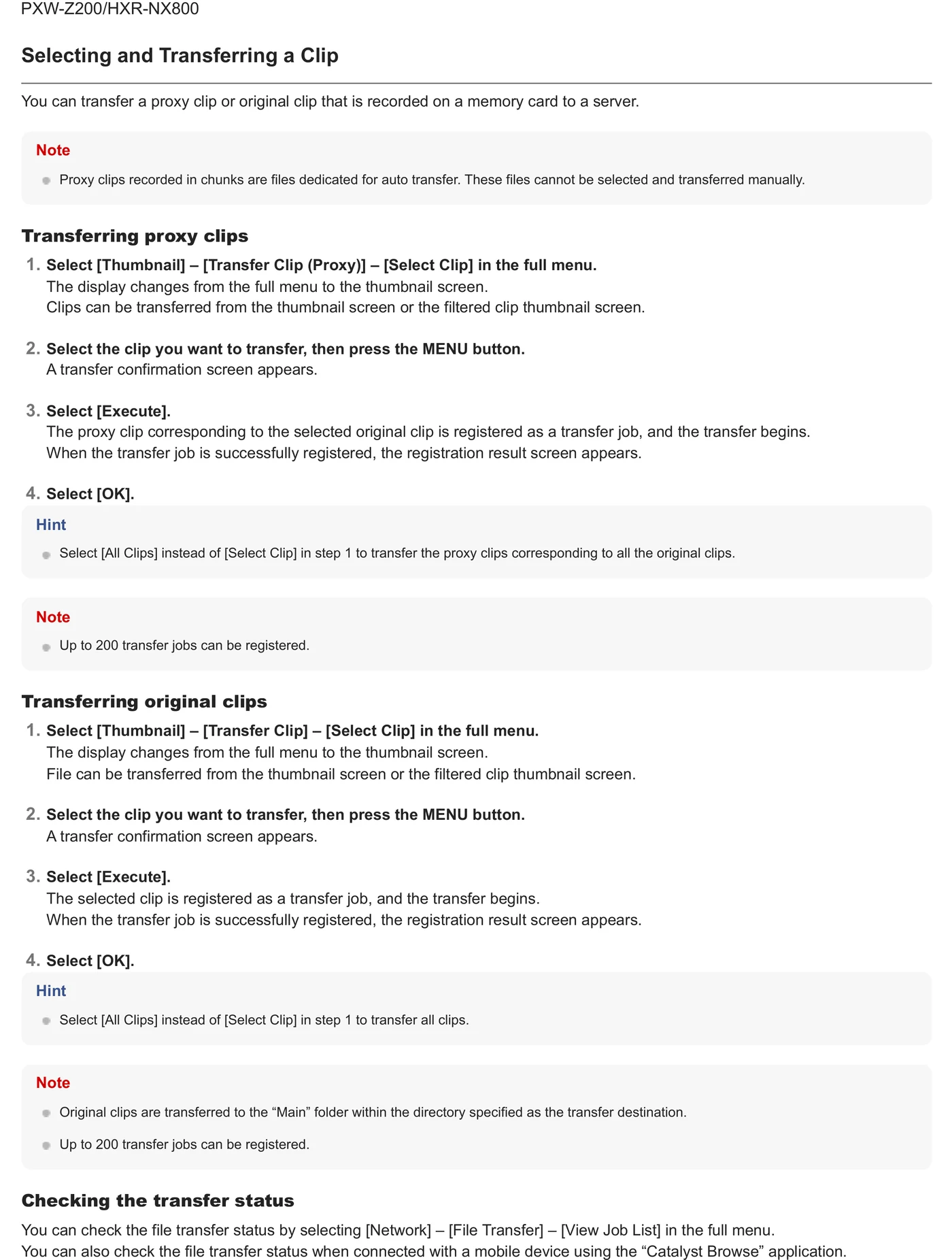
The menu, step by step

What moves, and what does not

Transfer modes

  • Manual path: direct camera FTP/FTPS is manual; CBK-WA100/101 firmware adds auto transfer after recording.
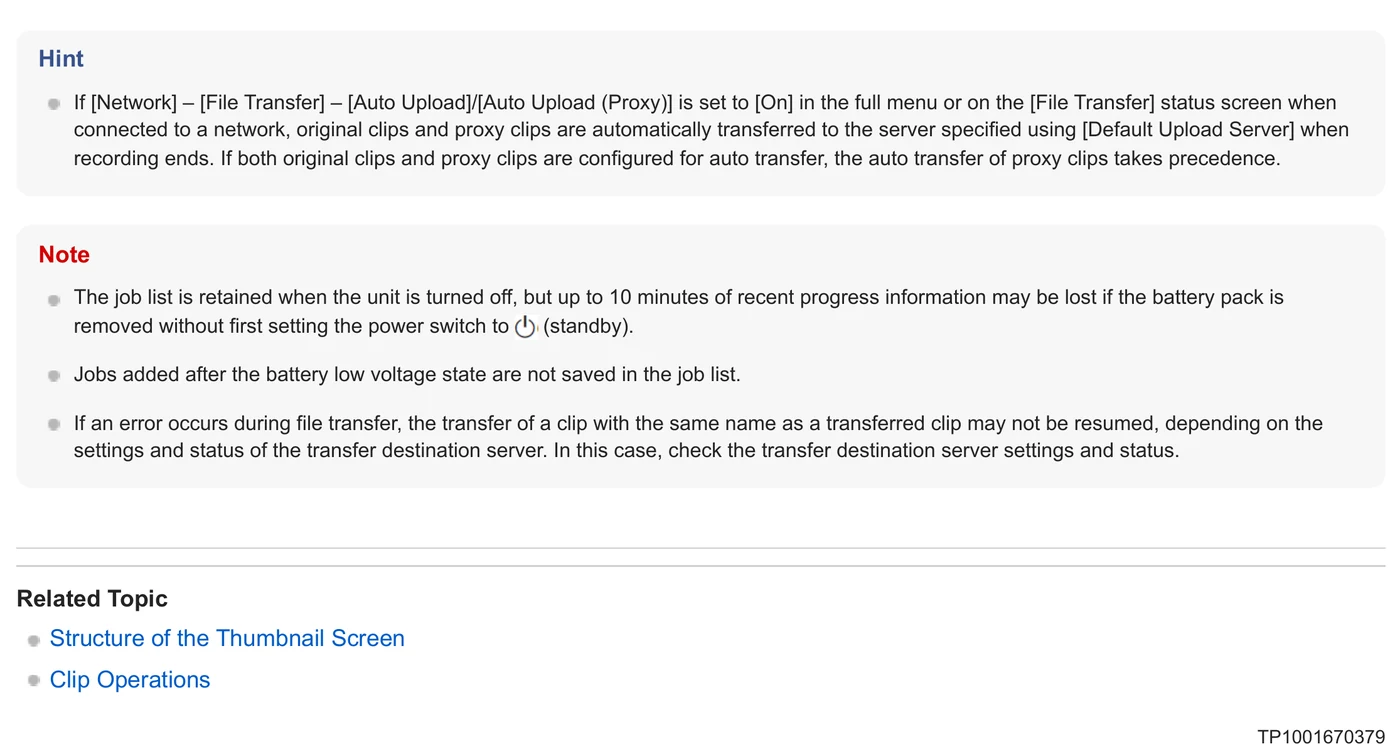
  • Automatic upload is available on this documented path.
  • Where chunked proxy upload is offered, treat it as a distinct mode from post-recording original-file upload.

Media behavior

  • Documented payload classes: original clips from optical disc, adapter-recorded proxy clips.
  • Proxy, original/high-resolution, partial, and chunked transfers are separate choices where present; verify the selected type before the event.
  • Use the camera or adapter job/status list as the first completion signal, then verify the object at the destination.

Limits and warnings

  • Required path/hardware: none for direct wired FTP/FTPS; CBK-WA100/101 for wireless/mobile transfer and adapter auto-upload workflows.
  • A product may also advertise a vendor-cloud workflow; this guide uses only the documented arbitrary-server path and does not treat vendor-cloud-only upload as interchangeable.
  • Camera SECURITY LEVEL2 uses FTPS but disables direct FTP transfer and some web functions; adapter capabilities depend on firmware

Prove it on your body

Run this checklist on the exact body, firmware, network, and media format you will use on assignment.

Camera SECURITY LEVEL2 uses FTPS but disables direct FTP transfer and some web functions; adapter capabilities depend on firmware Physical Camera to Anywhere interoperability is not yet lab-verified.

  1. 01Register one test server and make it the explicit destination.
  2. 02Upload a short proxy or small clip and confirm the transfer job reaches Completed.
  3. 03Open the received file and compare its size/duration with the source clip.
  4. 04Record which camera/adapter firmware, accessory, protocol, and port passed the test.
  5. 05If auto or chunk upload is enabled, record a short new clip and verify the expected original/proxy behavior.

If it will not send

01The File Transfer menu is missing or disabled.

Verify required firmware, option license, adapter attachment, recording state, and that the selected network mode permits file transfer.

02The server cannot be registered.

Confirm host syntax, protocol and port, DNS, passive/active mode, credentials, and the writable destination path.

03Secure FTP reports a certificate error.

Verify date/time, root CA import, server hostname, certificate chain, TLS compatibility, and revocation settings documented for the model.

04Proxy arrives but the original does not.

Check payload selection, auto-upload mode, recording codec/licence restrictions, media availability, and whether original transfer starts only after recording stops.

05A queued job repeatedly resumes or fails.

Check link stability, free storage, server timeout/size limits, adapter power, and camera job-list error text before retrying.

Sources

The local archive keeps this research reproducible if an official link changes. It is not redistributed through this site.

  1. 01

    Official manufacturer PDF

    NETWORK SETTING SECURITY: FTP/FTPS; Direct FTP transfer; CBK-WA100 notes

    Open manufacturer source ↗

official-pdf-download-blocked · retrieved 2026-08-26T04:40:28Z

Have this camera? Help us test the path.

Join for free